iFixit Teardown Reveals How Touchscreen MacBook Pro's Glowing Apple Logo Works [Video]
Apple brought the glowing logo back to the touchscreen MacBook Pro with four dedicated LEDs, according to a new iFixit teardown. Taking apart the 14-inch model also revealed where Apple saved weight and a welcome improvement for Touch ID repairs.
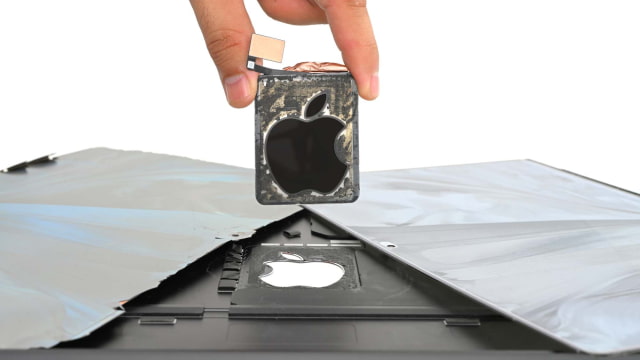
Older MacBooks borrowed light from the LCD backlight to illuminate the logo. The new tandem OLED display has no backlight, so Apple placed a strip of four LEDs along one edge of the logo module. A reflective layer and diffuser spread the light evenly, while a two-way mirror coating gives the logo a shiny finish when the lights are off.
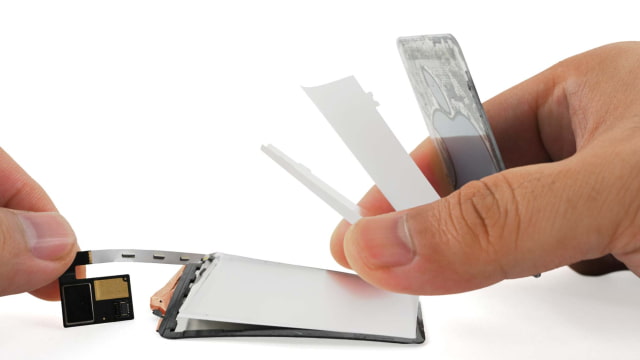
Getting to those LEDs proved much harder than replacing the complete lid. iFixit described the display assembly swap as straightforward, with simpler cable brackets and no separate lid-angle sensor. Separating the screen itself was another matter: the glass cracked and delaminated during removal, destroying the OLED and touch layers before the team reached the logo.
The hinge looks much like the three-screw design in the standard M6 MacBook Pro, despite Apple's changes to support touch. It resisted wobbling better when tapped near the top of the screen, which iFixit suggested could come from different spring tuning.
A logic board swap produced a more encouraging result. Apple's Repair Assistant recognized the battery, display, and Touch ID sensor, and True Tone, brightness controls, and touch all worked after calibration. iFixit could enroll a fingerprint with the donor board installed and again after restoring the original board. The touchscreen needed no separate calibration step.
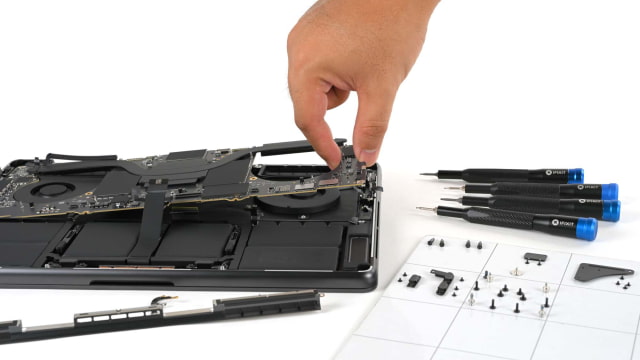
Much of the weight reduction came from the enclosure and lid. The chassis and bottom cover weighed 364 grams combined, compared with 456 grams for the standard M6 model. The display assembly dropped from 485 to 384 grams despite adding touch and the illuminated logo. The 72.6Wh battery was just two grams lighter.
Several familiar repair obstacles remain. Replacing the modular USB-C ports or fans still requires removing the logic board, while the HDMI port, SDXC card slot, memory, and storage remain soldered in place. The battery's adhesive pull tabs also proved difficult to remove.
iFixit awarded the notebook a repairability score of 5 out of 10, one point above the previous M5 MacBook Pro. Under its planned 2027 scoring system, which penalizes soldered memory more heavily, the same machine would score 4 out of 10.
The new MacBook Pro with PROLED XDR Display is available on Amazon. You can also read our review roundup and watch iFixit's full teardown below.