If your M1 Pro MacBook Pro still handles your work comfortably, a faster chip alone may not be much of a temptation. Apple's new OLED model gives you more to consider: a brighter touchscreen and a lighter laptop, without giving up the ports you already use.
The new PROLED XDR MacBook Pro arrives November 6, with Amazon pre-orders open for the 14-inch and 16-inch M5 Pro models.

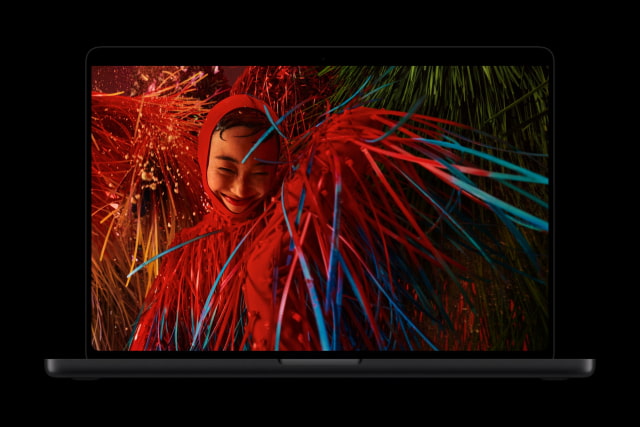
A Brighter Screen, With Touch
Both generations offer ProMotion up to 120Hz, and the screen sizes are nearly unchanged: 14.2 inches in both smaller models, or 16.2 inches on the 2021 large model versus 16.3 inches on the new one.
OLED changes how the picture is lit. Its pixels illuminate individually, rather than relying on backlight zones. Bright highlights against black backgrounds can avoid the glow around them that mini-LED can produce, making dark films, HDR photos, and high-contrast editing work particularly appealing uses for the new screen.
The 2021 screen is rated for 500 nits with normal SDR content. PROLED XDR reaches up to 1,000 nits sustained full-screen below 25°C, with peaks of 2,000 nits outdoors. Peak HDR brightness rises from 1,600 to 2,000 nits. The OLED model also adds Adobe RGB support and offers a nano-texture display option.
Touch lets you scroll a page, zoom into a photo, or tap a control directly on the display. Developers can also test touch interactions in their iPhone and iPad apps on the Mac screen. Existing Mac apps can respond through touch-to-click translation, while more tailored interfaces for Microsoft Office, Lightroom, and DaVinci Resolve are planned for later this year.
Dynamic Island replaces the notch, putting music controls and ongoing activities at the top of the screen. If you also carry an iPad for browsing and video, our touchscreen MacBook Pro vs. iPad Pro guide looks at whether the new Mac could take over those tasks.
Less Weight to Carry, Even at 16 Inches
The 14-inch M5 Pro OLED model weighs 3.0 pounds (1.38kg), down from 3.5 pounds (1.60kg) for the 2021 M1 Pro. At 16 inches, it drops from 4.7 pounds (2.10kg) to 4.0 pounds (1.82kg). That saves 220g and 280g respectively, while keeping the built-in HDMI and SD card connections.
The 16-inch Max sheds more weight: the M1 Max model was 4.8 pounds (2.20kg), while the OLED M5 Max is 4.1 pounds (1.84kg). That's a 360g reduction, compared with 280g for the Pro, although the new Max remains 20g heavier than the new Pro.
Both sizes are a little thinner and shallower. If the weight of your 16-inch Mac has made you consider a smaller replacement, the new design is worth handling in a store before you give up that workspace.

When the Faster Chip Will Actually Help
Long code builds, large photo batches, and rendering jobs give M5 Pro more opportunity to save you time than writing documents or checking email.
Apple's February tests put the 18-core M5 Pro at up to 2.5 times the multithreaded performance of M1 Pro. That comparison used the earlier non-OLED 16-inch models, with 64GB of memory in the M5 Pro and 32GB in the M1 Pro. The entry 14-inch OLED model has a 15-core CPU; the 18-core chip is optional at 14 inches and standard at 16 inches.
M1 Pro came with 16GB or 32GB of memory. The new M5 Pro starts at 24GB and offers 48GB, with 64GB available on the 20-core GPU version. If a 16GB Mac struggles when your normal projects and apps are open together, check Memory Pressure in Activity Monitor's Memory tab while doing that work. It can help establish whether more memory would address the slowdown.
If your M1 Pro has 32GB, the entry 24GB OLED model would be a step down in capacity. Storage can go backward too: M1 Pro was configurable with an 8TB SSD, while the new M5 Pro stops at 4TB. Larger internal SSDs require M5 Max.
Check the Battery Before Replacing the Whole Mac
A five-year-old laptop that needs charging more often may need a new battery rather than a new computer. Open System Settings, choose Battery, and check Battery Health. If macOS shows "Service Recommended" and the rest of the machine still meets your needs, get a service estimate before spending thousands on a replacement.
Apple rates the OLED M5 Pro models for up to 14 hours of wireless web use at 14 inches and 17 hours at 16 inches. The original M1 Pro ratings were 11 and 14 hours. These are ratings for new machines tested with different configurations and software; your old Mac's battery health will affect the difference you see. The video figures in the table below also use different tests: Apple TV app playback in 2021 and Safari streaming in 2026.
The 2021 models also remain compatible with macOS 27 Golden Gate. You do not need a new Mac simply to run the current operating system.
Better Connections and a More Useful Camera
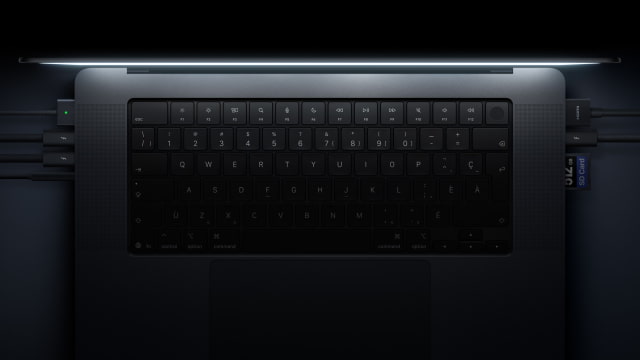
Your M1 Pro already has three Thunderbolt 4 ports, HDMI, SDXC, MagSafe 3, and a headphone jack. The OLED model keeps that selection while moving to Thunderbolt 5. The faster ports can help with high-speed storage and newer docks, while your existing USB accessories still work.
M5 Pro supports up to three external displays alongside its built-in screen, compared with two on M1 Pro. The new laptop also brings Wi-Fi 7 and Bluetooth 6, plus a 12MP Center Stage camera with Desk View and video stabilization in place of the old 1080p FaceTime HD camera. Center Stage keeps you framed as you move during a call, while Desk View can show what is on the desk in front of you.
A Note for M1 Max Owners
An M1 Max owner using four external displays will need M5 Max to keep that setup; M5 Pro supports three. If you need 64GB of memory, that is available on M5 Pro with the 20-core GPU or M5 Max with the 40-core GPU. The latter also offers 128GB.
You Can Get M5 Pro Without Paying for OLED
Apple's U.S. starting prices for the OLED M5 Pro are $2,899 for the 14-inch model and $3,399 for the 16-inch model, both with 24GB of memory and a 1TB SSD. Amazon pre-orders are open ahead of the November 6 release.
Apple also still sells the Liquid Retina XDR M5 Pro. As of October 30, our 14-inch M5 Pro price tracker lists the 24GB/1TB model at $2,289 from Amazon and B&H, compared with its $2,499 Apple retail price. That is $610 less than the entry OLED model with the same CPU and GPU core counts, memory, and storage.
If you're replacing an M1 Pro mainly for faster builds or exports, the non-OLED M5 Pro gives you the newer chip and Thunderbolt 5 for less. Our OLED vs. standard MacBook Pro comparison takes a closer look at what the extra money buys.
M1 Pro and OLED M5 Pro Specifications
| Feature | M1 Pro (2021) | OLED M5 Pro (2026) |
|---|---|---|
| Display | 14.2-inch or 16.2-inch Liquid Retina XDR; mini-LED | 14.2-inch or 16.3-inch tandem OLED touchscreen |
| Resolution | 14-inch: 3024 × 1964. 16-inch: 3456 × 2234. | 14-inch: 3024 × 1986. 16-inch: 3472 × 2266. |
| Brightness | SDR: 500 nits. HDR: 1,000 sustained full-screen below 25°C; 1,600 peak. | SDR/HDR: up to 1,000 sustained full-screen below 25°C; 2,000 peak HDR / outdoor SDR. |
| Refresh rate | ProMotion, up to 120Hz | ProMotion, 10–120Hz |
| Color / contrast | P3; 1,000,000:1 contrast | P3 + Adobe RGB; 10,000,000:1 contrast |
| Input | Keyboard, trackpad, Touch ID | Touchscreen, keyboard, trackpad, Touch ID; Dynamic Island |
| CPU | 14-inch: 8 or 10 cores. 16-inch: 10. | 14-inch: 15 or 18 cores. 16-inch: 18. |
| GPU | 14-inch: 14 or 16 cores. 16-inch: 16. | 14-inch: 16 or 20 cores. 16-inch: 20. |
| Memory options | 16GB or 32GB | 16-core GPU: 24GB or 48GB. 20-core GPU: 24GB, 48GB or 64GB. |
| Memory bandwidth | 200GB/s | 307GB/s |
| SSD options | 512GB, 1TB, 2TB, 4TB or 8TB | 1TB, 2TB or 4TB |
| Weight | 14-inch: 3.5 lb (1.60kg). 16-inch: 4.7 lb (2.10kg). | 14-inch: 3.0 lb (1.38kg). 16-inch: 4.0 lb (1.82kg). |
| Dimensions | W × D × H, cm. 14-inch: 31.26 × 22.12 × 1.55. 16-inch: 35.57 × 24.81 × 1.68. | W × D × H, cm. 14-inch: 31.08 × 21.63 × 1.50. 16-inch: 35.55 × 24.42 × 1.60. |
| Camera | 1080p FaceTime HD | 12MP Center Stage; Desk View; video stabilization |
| Ports | 3 Thunderbolt 4; HDMI, SDXC, MagSafe 3, headphone jack | 3 Thunderbolt 5; HDMI, SDXC, MagSafe 3, headphone jack |
| External displays | Up to 2, plus built-in screen | Up to 3, plus built-in screen |
| Wireless | Wi-Fi 6; Bluetooth 5.0 | Wi-Fi 7; Bluetooth 6; Thread |
| Apple video rating | Up to 17h (14-inch) / 21h (16-inch), Apple TV app playback | Up to 22h (14-inch) / 24h (16-inch), video streaming |
| Apple wireless web rating | Up to 11h (14-inch) / 14h (16-inch) | Up to 14h (14-inch) / 17h (16-inch) |
| Battery capacity | 14-inch: 70Wh nominal. 16-inch: 100Wh nominal. | 14-inch: 72.6Wh. 16-inch: 100Wh. |
| Fast charging | Fast charge: 14-inch with 96W; 16-inch with included 140W. | Fast charge: 14-inch with 96W+; 16-inch with 140W+. |
| Audio | Six speakers; three-mic array | Revised six speakers; three-mic array |
Is It Finally Time to Upgrade?
We would keep an M1 Pro that still handles your work comfortably, especially if you normally use an external monitor. A battery service may be all it needs, and the current macOS still supports it.
If you work on the built-in screen and carry your Mac most days, the OLED model is a much more tempting replacement. You get a brighter display, touch controls, and less weight to carry, alongside the performance upgrade.
If performance is the only problem, compare the non-OLED M5 Pro first. Check the iClarified Mac price tracker for current pricing and availability across tracked retailers before ordering.

![iPhone 18 Pro Sales Rise 29% in China, Fall in U.S. and Japan [Report]](/images/news/103215/103215/103215-160.jpg "iPhone 18 Pro Sales Rise 29% in China, Fall in U.S. and Japan [Report]")



![Apple Allocated 80% of Initial iPhone Duo Stock to Stores [Gurman]](/images/news/103206/103206/103206-160.jpg "Apple Allocated 80% of Initial iPhone Duo Stock to Stores [Gurman]")

![How To Back Up Your iPhone to an External Drive on Mac [Video]](/images/tutorials/72786/72786/72786-160.jpg "How To Back Up Your iPhone to an External Drive on Mac [Video]")
![How To Find Your IP Address on iPhone [Video]](/images/tutorials/496/496/496-160.jpg "How To Find Your IP Address on iPhone [Video]")


![Apple Watch Ultra 4 Drops Back to All-Time Low of $699.99 ($99 Off) [Deal]](/images/news/103218/103218/103218-160.jpg "Apple Watch Ultra 4 Drops Back to All-Time Low of $699.99 ($99 Off) [Deal]")
![AirTag 2 4-Pack Hits All-Time Low of $69.99 ($29 Off) [Deal]](/images/news/103203/103203/103203-160.jpg "AirTag 2 4-Pack Hits All-Time Low of $69.99 ($29 Off) [Deal]")

![Beats Headphones, Earbuds, and Pill Speaker Are Up to 41% Off [Deal]](/images/news/103026/103026/103026-160.jpg "Beats Headphones, Earbuds, and Pill Speaker Are Up to 41% Off [Deal]")