These are instructions on how to change the root SSH password on your jailbroken iPhone or iPod touch. This password is required when using SSH to connect to your device.
Step One If you do not already have MobileTerminal installed please follow these instructions to install it.
Step Two Press to launch MobileTerminal from your iPhone Springboard.
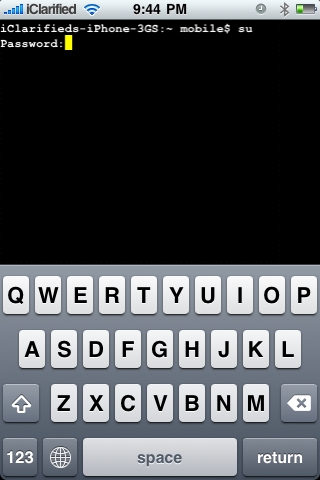
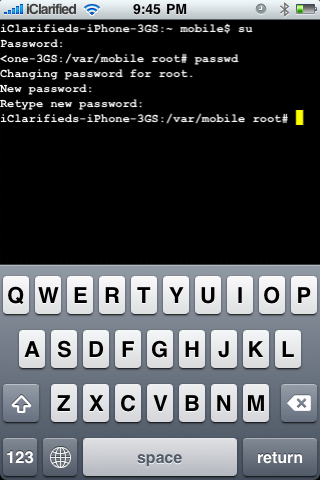
Step Three Input su into the terminal window then press the return key.
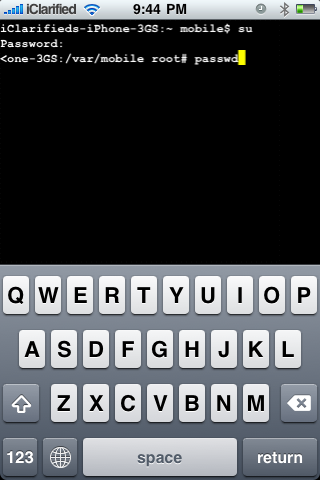
Step Four You will be asked to input the current root user password. Input alpine then press the return key.
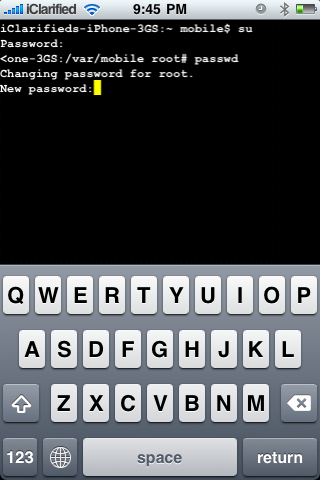
Step Five Once you have logged in as the root user input passwd into the terminal window then press the return key.
You will be prompted for new password. Input a password of your choice then press the return key.
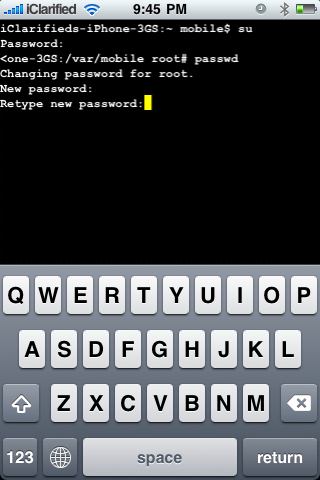
You will be asked to retype the new password. Do this, then press the return key to finalize your change.
Get the iClarified Daily Newsletter
Apple news, rumors, tutorials, price drop alerts, in your inbox every evening, free.
Unsubscribe at any time.
Success!
You have been subscribed.
Add Comment
Would you like to be notified when someone replies or adds a new comment?
Yes (All Threads)
Yes (This Thread Only)
No
Notifications
Would you like to be notified when we post a new Apple news article or tutorial?
When I click on the Terminal icon, Terminal opens for about a second and shots down again. I tried reinstalling and it keeps behaving exactly as I described above.
Any ideas?
You probably have iPhone 4 and iOS4... I also had this problem. Here is the solution: remove it, then install the beta package under the name of "MobileTerminal iOS4" (search it on Cydia).
gosh.. ever since i changed both passwords. Im not able to log into my hotmail or yahoo mail or anything that requires login and password using iphone safari. Help!!!!!
If I forgot my password, is the only way to reset it to restore my phone? I already tried reinstalling Open SSH. I THOUGHT that I knew my password but it's not letting me in, so I just need to reset the password to alpine. Any way of doing this without having to restore?
Do these if you are stuck at purple screen. If you are stuck at the purple screen, do these steps!!! (Only on 3GS or 4) 1) put your iphone to Airplane mode. 2) Go to -> Setting -> safari -> Cookies -> Accept. 3) Double tap home button. 4) Press and hold to quit safari (in multitask mode) 5) Clear all Cache n cookies. 6) Open safari and go to jailbreakme.modmyi.com 7) If cannot, Repeat!
clarification: The iPhone has two accounts, the 'root' or master admin account, and the 'mobile' or user account. The 'mobile' account has access via ssh to all of your personal data like email, sms, contacts, etc.
How to change: Pretty simple. Notice in the instructions above that when you first open Terminal on the iPhone, you're logged in as 'mobile' already, you can tell by the name before the $ on the prompt. Before you follow iClairified's instructions in the guide, just enter the command passwd to change it for 'mobile', then you can do the 'su' command to change to 'root' to change that password.
What i did (i think) is:
open terminal (there i found what i previously typed)
thouched the screen and pressed 'clear' then 'quit'.
Then i restarted terminal and found it back to it's original state. I was then able to follow the instructions
hope i'm right;-)
@johnbull - what Chris did will work, but you can also just type 'exit' to get out of su mode, at which point you'll be back as the 'mobile' user. Or, while in 'root' mode, you could also type 'passwd mobile' and follow the prompts. Best, in my opinion to get out of 'root' mode the sooner the better, so you don't do any accidental damage to the system.





![Apple Says iPhone Duo's Folding Display Has a Replaceable Cover Layer [Video]](/images/news/102525/102525/102525-160.jpg "Apple Says iPhone Duo's Folding Display Has a Replaceable Cover Layer [Video]")
![Touchscreen OLED MacBook Pro Could Debut as Early as October [Gurman]](/images/news/102519/102519/102519-160.jpg "Touchscreen OLED MacBook Pro Could Debut as Early as October [Gurman]")
![iPhone 18 Pro Sales Rise 12% in China as Apple Leads Weekly Smartphone Market [Report]](/images/news/102522/102522/102522-160.jpg "iPhone 18 Pro Sales Rise 12% in China as Apple Leads Weekly Smartphone Market [Report]")
![Apple TV Shares Trailer for 'Awkwafina: The Unlikely Cook' [Video]](/images/news/102513/102513/102513-160.jpg "Apple TV Shares Trailer for 'Awkwafina: The Unlikely Cook' [Video]")
![How To Find Your iPhone IMEI Number [Video]](/images/tutorials/83557/83557/83557-160.jpg "How To Find Your iPhone IMEI Number [Video]")

![How To Change Wallpaper on Mac [Video]](/images/tutorials/90512/90512/90512-160.jpg "How To Change Wallpaper on Mac [Video]")




![16-Inch M5 Max MacBook Pro Drops $900 to New Low of $3,499 [Deal]](/images/news/102438/102438/102438-160.jpg "16-Inch M5 Max MacBook Pro Drops $900 to New Low of $3,499 [Deal]")
![Magic Keyboard for iPad Air Drops to $200 on Amazon [Deal]](/images/news/102402/102402/102402-160.jpg "Magic Keyboard for iPad Air Drops to $200 on Amazon [Deal]")
![13-Inch M5 MacBook Air With 1TB Drops to $1,449 on Amazon [Deal]](/images/news/102345/102345/102345-160.jpg "13-Inch M5 MacBook Air With 1TB Drops to $1,449 on Amazon [Deal]")
