These are instructions on how to enable MMS capabilities on your iPhone 2G. You must be jailbroken on the 3.0 iPhone firmware to do this.
You can find instructions on how to jailbreak your iPhone here: Windows, Mac
IMPORTANT: This patch will ENABLE the MMS feature on the 3.0 firmware. It will NOT input the correct settings for your carrier. Therefore MMS will only work once the correct carrier settings are set.
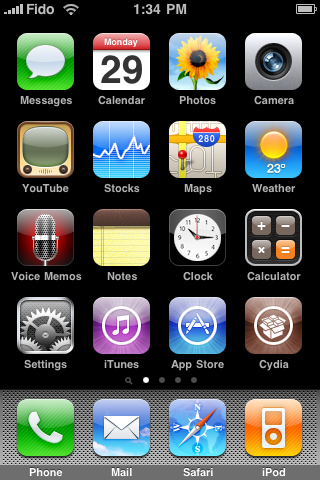
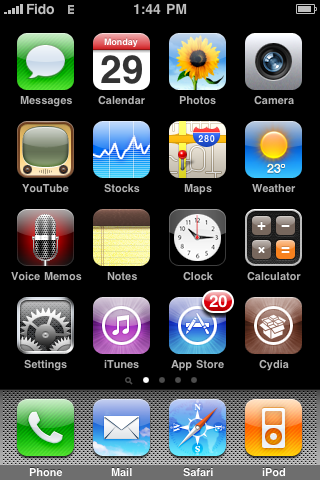
Step One Press to launch Cydia from your SpringBoard
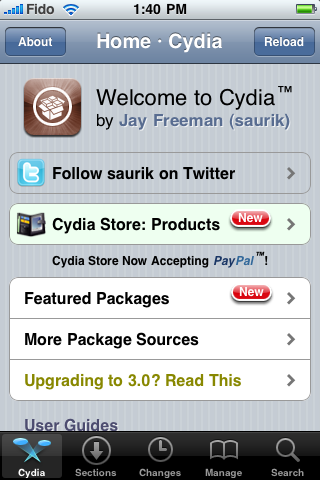
Step Two Press to select the Sections tab at the bottom of the screen
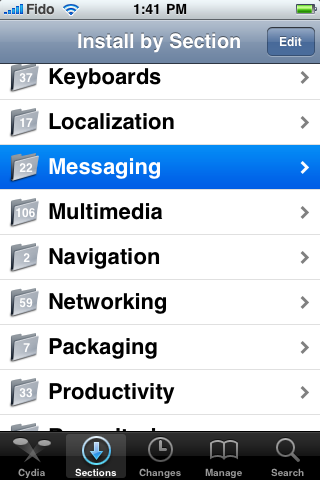
Step Three Press to select Messaging from the list of Categories
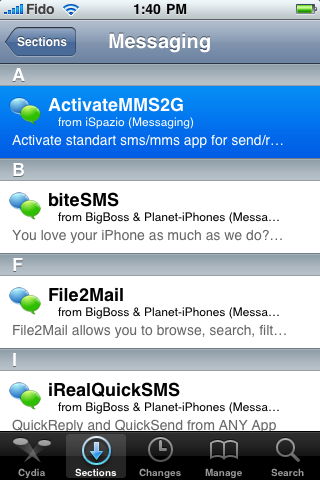
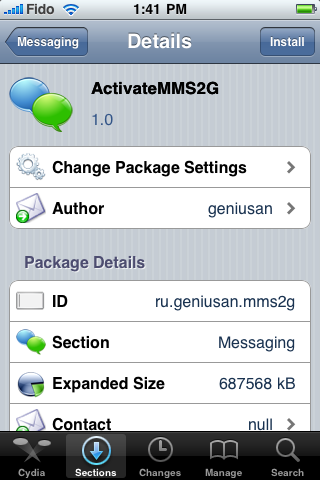
Step Four Press to select ActivateMMS2G from the list of Packages
Step Five Press the Install button at the top right of the screen
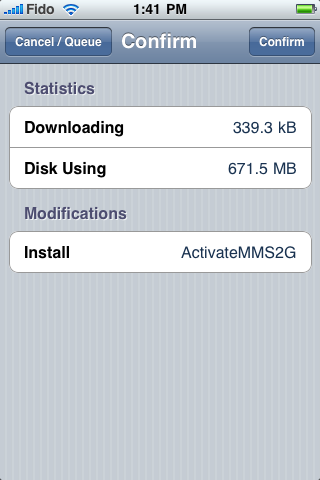
Step Six Press the Confirm button at the top right to begin installation.
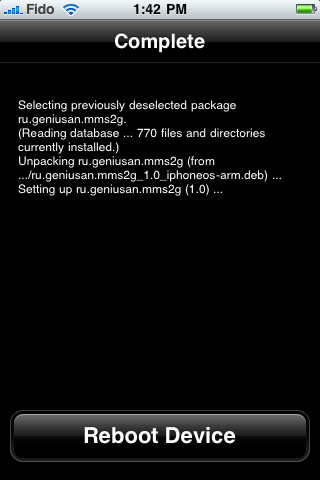
Step Seven Once installation has completed successfully press the large Reboot Device button.
Step Eight You iPhone will now be automatically restarted. Once the reboot has completed tap to open the messages application from the Springboard.
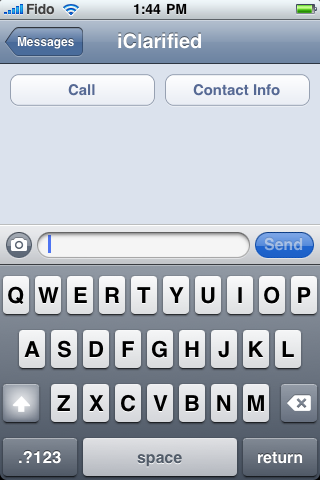
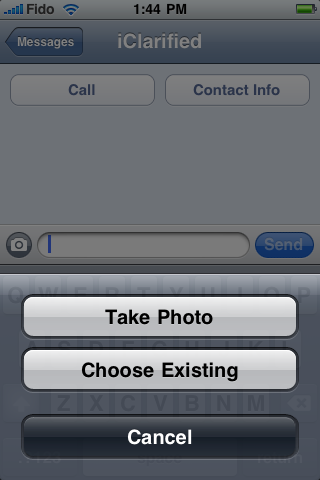
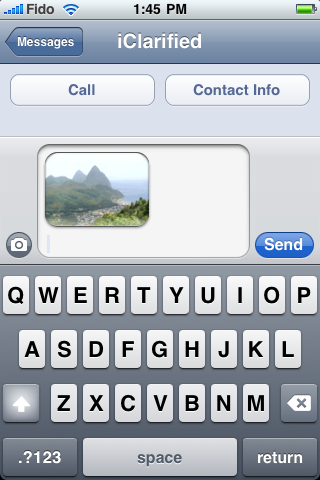
Notice you now have MMS capabilities. Please be aware that your cellular provider may charge an additional fee for using MMS. Please contact them before send an MMS to verify charges.
Thanks go out to geniusan the author of this patch! You can learn more about how to use MMS here
To input your networks settings please navigate to Settings - General - Network - Cellular Data Network Settings
Get the iClarified Daily Newsletter
Apple news, rumors, tutorials, price drop alerts, in your inbox every evening, free.
Unsubscribe at any time.
Success!
You have been subscribed.
Add Comment
Would you like to be notified when someone replies or adds a new comment?
Yes (All Threads)
Yes (This Thread Only)
No
Notifications
Would you like to be notified when we post a new Apple news article or tutorial?
So i can't find this anywhere under the ispazio repository in Cydia. Has there been an update on this? i've tried searching through the net for a fix, i've tried the iphonorepo and some other ones but no luck. anything?
After upgrading to 3.1 DO NOT enable MMS using this. I tried it 3 times and it hung my iphone 2G. If it is hung enter DFU mode using the tutorial in iclarified. After which use the DFU mode in PWNAGE and then restore normally with the custom firmware you already built
My laptop does not see my iphone when I connect the device to my computer. Did you have this problem before? And how could you solve it?
Could you please tell me how to enter DFU mode? Thank you so much.
No! Activatemms2G does NOT work for 3.1! It will brick your phone and it just becomes a big hassle. We're going to have to wait till someone makes a patch for this.
I just tried this and got this message "NetDB: Open nodename nor servname provided, or not known."
Any ideas on what this means and if there's a way around it or not?
After installing this, my phone just hung on apple logo. After several tries of Power and home button combination, it gave me the option to restore. I reconfigured the phone, as i did when newly purchased and resynched everything.
Did the MMS install twice and it did not work at all. Both time I had to reinstall everything from scratch..
Although it works perfectly, ActivateMMS2G has the unfortunate effect of dividing by 6 the idle autonomy of my iPhone V1 (300+ hours -> less than 48).
The same problem has been found by others.
Let's hope for an update of ActivateMMS2G since it was a great add-on to all V1 iPhones.
My configuration : iPhone v1 US, BL 3.9, jailbroken + desimlocked with redsn0w-mac_0.8
what i did was that i got swirly & checked its setting & typed all its info for my network setting after installing the activation, after 2 reboots it worked & i got the camera on my sms app!
My issue is not only did it not work for me, but after I installed, I could not even launch Cydia. It would open then crash. Wound up bringing my phone back to factory settings. Any idea what I did wrong?
I seem to have the opposite problem as everyone else. I have both APN and MMS APN setting enabled. They're both set at internet2.voicestream.com It was working normally for me but then after I upgraded the 'mobile substrate' on Cyidia I don't have a camera icon of the option to turn MMS on in the settings app. Could mobile substrate have something to do with it? I tried resetting my phone, I turned off and uninstalled all apps that use mobile substrate and still nothing. However, MMS APN settings remained through out. I'm so confused :|
Hi i installed the activemms2g and it didnt work for me. i reinstalled it and it still didnt work for me. i didnt get the button on the messaging screen. can anyone help?
Bro,
You have to get the Carrier bundle. UnInstall Activate2gmms & reboot. Then go into Cydia make sure you have the Mod My I repository (if not add it as a resource on the cydia frot page). Look for the T mobile Bundle Carrier Pack ( I assume you are t-mobile. Install it. Re boot. Then you should have the Toggle switches in Messages setting. Once you do that Then Install Activate2gMMS Then you should be good to go, Well after you change the APN via Unlockit,co.nz Google That on Safari via Iphone.
Joey Long Balls AKA LAshley
just adjust your settings in SETTINGS>GENERAL.NETWORK>CELLULAR DATA NETWORK first. There's a link earlier in the thread to the settings. After that reboot your phone if you already have the mms installed and there you have it. If you do not have it, just install it and reboot. REMEMBER TO GET THE SETTINGS CORRECT FIRST!!!!!!!
Article explains in deep how to install ActivateMMS2G to make it work on 99% of all the iPhones 2G. No Camera issue, no Cellular Data Network Save Error, no Send Error.
This is almost there, thank you for that! How do you get the MMS APN, Username and Password entries to stick though when you have different APN data for MMS and Cellular Data? I am on Vodafone UK and the MMS settings get deleted when I come out of network settings.
ahmad, Thank you very much for the link! Worked first time. My wife is very happy, she is sending and receiving MMS on her iPhone 2G on the Vodafone UK network now.
I just tried to do this now my phone is stuck with the apple and it wont do anything. I did the reboot by holding home button and power button comes to apple screen again and stops there. I then tired to hook up to itunes and it dosent register. Can anybody help ?????
Hey, the same thing happened to me. What you need to do is hold the power button down until it is off, then plug it into your computer. Turn the phone off again and go onto redsn0w and jailbreak it over again. I just did this five minutes ago and it worked. Hope this helps : )





![Apple Releases First Betas of iOS 27, iPadOS 27, macOS 27 to Developers [Download]](/images/news/101120/101120/101120-160.jpg "Apple Releases First Betas of iOS 27, iPadOS 27, macOS 27 to Developers [Download]")







![Apple Watch Series 11 is Back on Sale for Just $299 [Deal]](/images/news/101081/101081/101081-160.jpg "Apple Watch Series 11 is Back on Sale for Just $299 [Deal]")
![AirPods Max 2 Drop to New All-Time Low of $499 [Deal]](/images/news/101063/101063/101063-160.jpg "AirPods Max 2 Drop to New All-Time Low of $499 [Deal]")
![AirPods Max 2 Hit All-Time Low Price of $509 ($40 Off) [Deal]](/images/news/101039/101039/101039-160.jpg "AirPods Max 2 Hit All-Time Low Price of $509 ($40 Off) [Deal]")
![New 13-Inch M5 MacBook Air Hits All-Time Low Price of $899.99 [Deal]](/images/news/100969/100969/100969-160.jpg "New 13-Inch M5 MacBook Air Hits All-Time Low Price of $899.99 [Deal]")
![AirPods Pro 3 Drop to $199 Ahead of Memorial Day [Deal]](/images/news/100935/100935/100935-160.jpg "AirPods Pro 3 Drop to $199 Ahead of Memorial Day [Deal]")
