***** IMPORTANT: These instructions have been updated for the latest iPhone firmware. Please follow the up to date instructions here *****
These are instructions on how to jailbreak your iPhone 3G on the 3.0.x iPhone firmware using RedSn0w for Windows. The Mac version of this tutorial is here. The 2G version of this tutorial is here
This tutorial can be used to jailbreak before applying the UltraSn0w unlock.
** If you would like to jailbreak on the 3.0.1 firmware you can follow these exact instructions; however, in Step Two restore using this 3.0.1 iPhone firmware file instead of the 3.0 one. Continue with the instructions as indicated.**
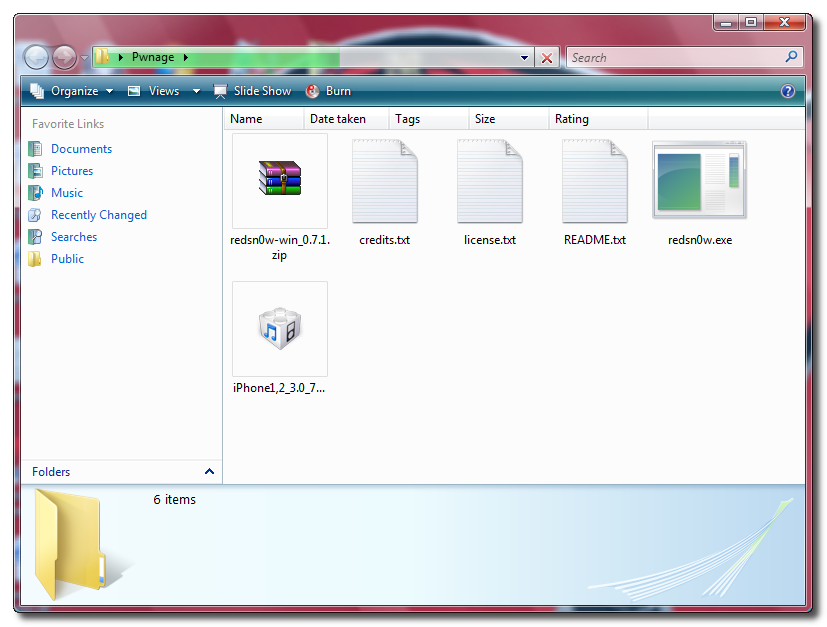
Step One Create a folder on your desktop called Pwnage
Download RedSn0w from here and place it in the Pwnage folder. Likewise, download the latest 3.0 firmware from below and place it in the same folder.
Extract the RedSn0w zip file to the Pwnage folder.
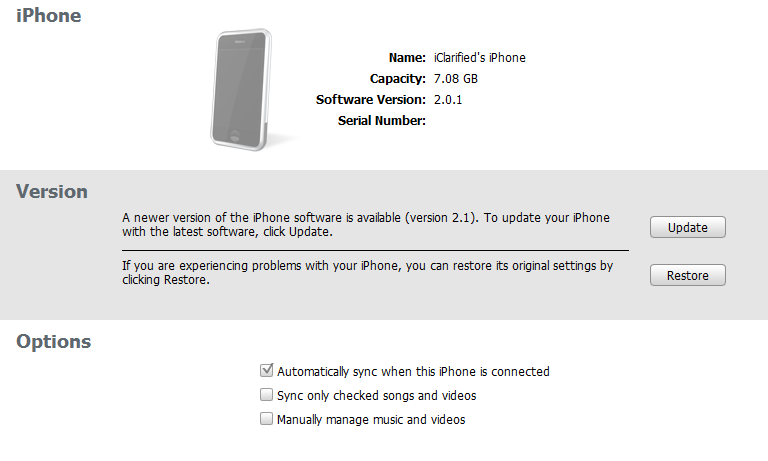
Step Two Connect your iPhone to the computer and launch iTunes.
Select your iPhone from the list of devices on the left. Now hold down shift and click the Restore button. Restore is preferred as it won't create any wasted space on your iPhone.
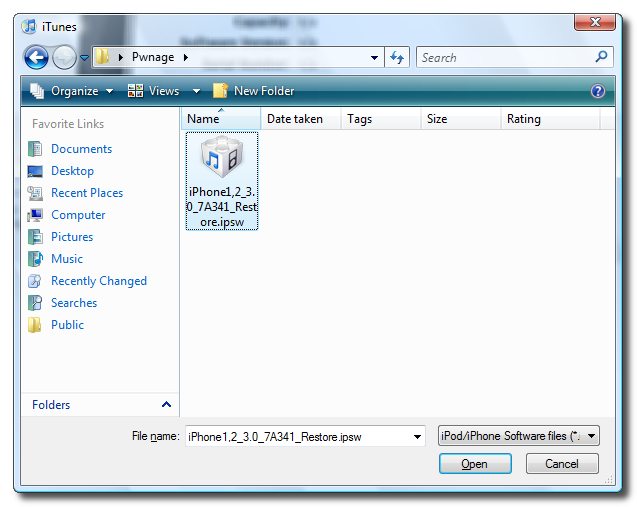
Navigate to the Pwnage folder on your desktop and select the firmware ipsw. Click the Open button to continue.
Step Three Once iTunes has finished updating your iPhone to the desired firmware you may launch redsnw0w.exe from the Pwnage folder on your desktop.
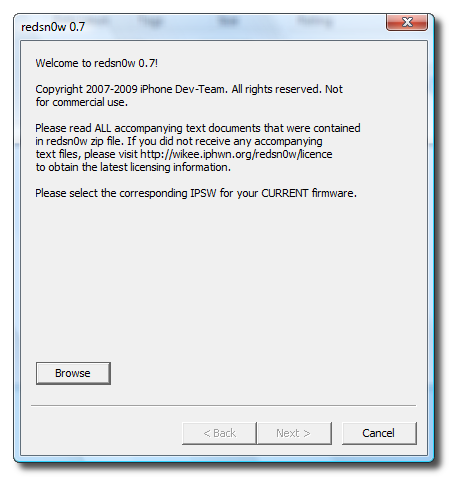
Step Four Once RedSn0w opens click the Browse button
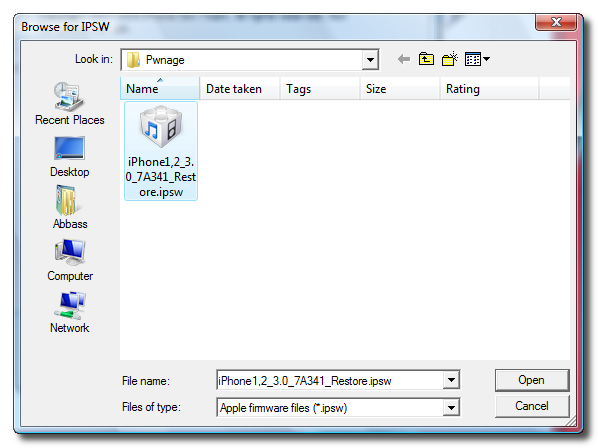
Step Five Select the firmware ipsw we placed in the Pwnage folder on our desktop then click Open
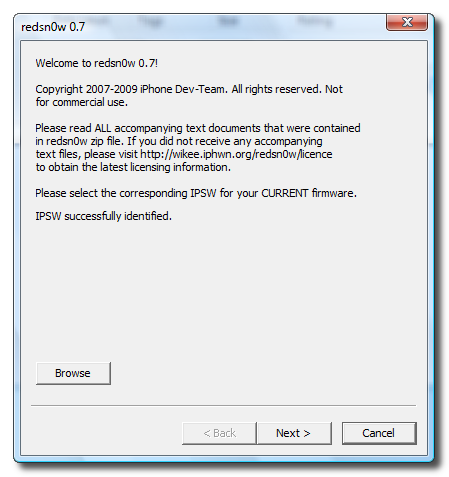
Step Six Once the firmware has been verified click the Next button to continue.
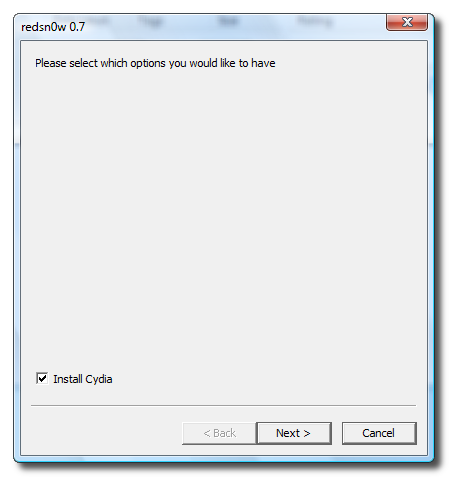
Step Seven Make sure Cydia is selected and click the Next button.
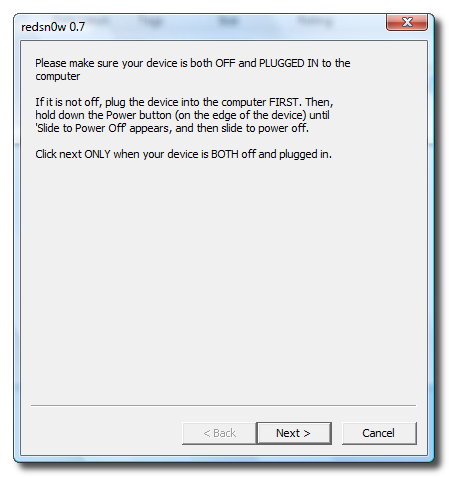
Step Eight Please plug your iPhone into the computer and make sure its OFF then click the Next button
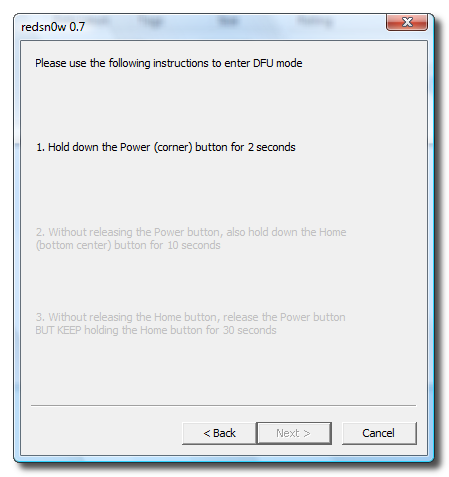
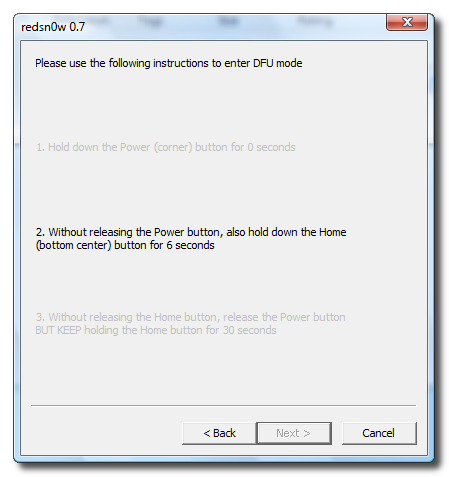
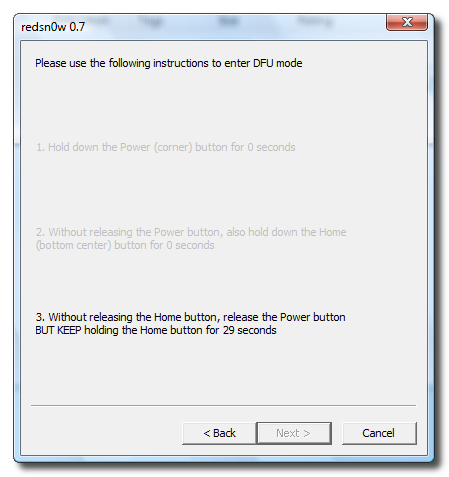
Step Nine RedSn0w will now guide you through the steps to get into DFU mode.
Hold down both the Home button and the Power button for 10 seconds.
Release the Power button and continue holding the Home button until RedSn0w detects the device.
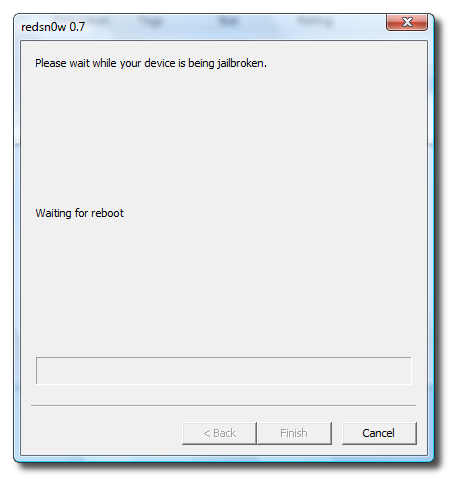
Step Ten Your iPhone will now reboot
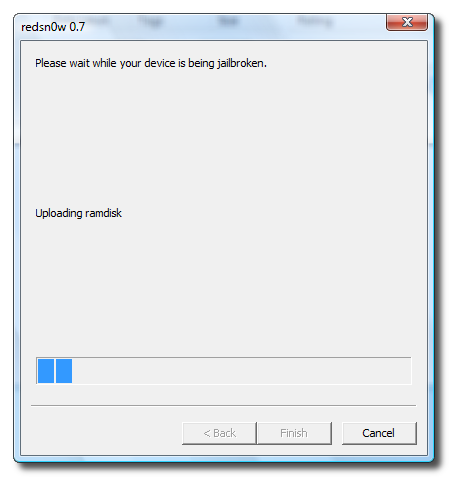
Step Eleven RedSn0w will then begin uploading the new RAM Disk.
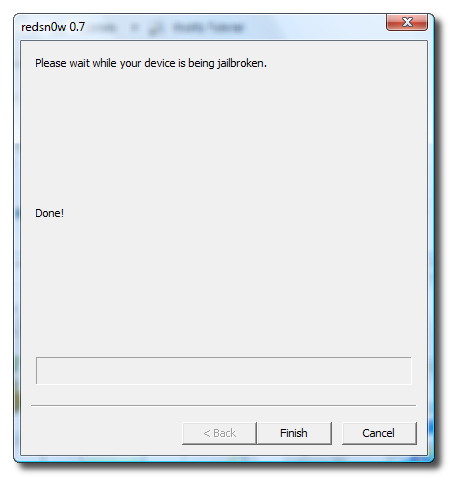
Step Twelve Once this is complete you will be notified that RedSn0w is done. Click the Finish button. When your iPhone finishes reboot (5 minutes or so). It will be jailbroken with Cydia on the SpringBoard.
Get the iClarified Daily Newsletter
Apple news, rumors, tutorials, price drop alerts, in your inbox every evening, free.
Unsubscribe at any time.
Success!
You have been subscribed.
Add Comment
Would you like to be notified when someone replies or adds a new comment?
Yes (All Threads)
Yes (This Thread Only)
No
Notifications
Would you like to be notified when we post a new Apple news article or tutorial?
Hi,
I have an iphone 3gs , with 3.1 version & 05.11.07 firmware. Already JB+UL using Cydia/blackra1n . So my question is
I want to update to 3.1.3 , will this tutorial work for me , as nowhere mentioned 3Gs here ?
I just got an iphone, and i updated it on itunes, now it says that its version 4,, i thni the firmware is 4,, so when I tried to restore this one here, it didnt work, its say it not compatible.. what should I do , please help :(
When I download the current restore it does come in a cube like the picture but zip books and everytime I try to extract it to my desktop or to my pwnage folder I can't get it to open or what ever I need to do please help!
After pressing save as, Change the file type (lowest box in window) to all files from.zip. It will then save as you need it. N.B. Ensure the file name ends .ipsw If not manually type it in before saving.
Hi All,
I managed to jailbreak my iphone 3g on 3.0
However, when I try opening cydia, it says "loading data" and then automatically crashes"
I have jailbreaked many times but no luck. I used the files in the post above but still not working. I have also tried setting the iphone as a new phone in itunes but not working.
any ideas???
Hi
When you choose "iPhone1,2_3.0.1_7A400_Restore.ipsw" in redsn0w and you get the error message "Unable to recognize specified IPSW" choose "iPhone1,2_3.0_7A341_Restore.ipsw" instead and it should work.
If redsn0w 0.8 crashes in Vista when you try to jailbreak then right click on redsnow 0.8.exe and go to properties
and in there go to compatibility
there set it to "windows xp service pack 2" and then go down and check the "run as
administrator"
Run the process again and it should work. It worked it for me
Hope this to some help.
i suggest not updating the carrier settings after the jailbreak. I launched itunes and it prompted me to update the carrier settings i did it and I couldn't connect to the network overseas anymore so i have to restore the software with itunes and the backup which took another hour or more.
Thank you very much for this very helpful thread, now my iphone 3g is updated to OS3.0, jailbroken and unlocked. Even the comments and reply to the comments were very useful. Thanx to iclarified and to all those who shared helpful insights in the comment section.
Hi, I am using iPhone 3G and I have updated to 3.0 using Windows (redsn0w). Everything has been done well (as per iClarified stated) but I can't find network signals and no carrier option in setting menu. Please help me, it is the second time I am facing the same problem. Please reply.
Hi Yank, From what I understand, you need to unlock your phone. This tutorial is only to Jailbreak it, so now that you have done that well, find the tutorial that teaches you how to Unlock your iPhone 3G. That should solve you prob. Good luck!
I have a 3G j/b and unlocked iPhone (I j/b and unlocked it when it had 2.2 s/w and baseband was 2.28). After that, I tried re-jailbreaking it and unlocking it to the 3.1.2 with blackra1n. Nothing happened, literally nothing (I'm guessing since the baseband wasn't at 5.11). Then I read details on redsn0w using this tutorial (to j/b and unlock to 3.0.1). I tried that method, but accidentally (i KNOW! crazy huh!) updated the phone to 3.1.2 through iTunes (using a custom ipsw from iClarified though, pressing shift+restore). Now I can't get the phone to work. So both redsn0w and blackra1n didn't work for me because of the accidental update. Is it possible to fix it? Perhaps wait for the next release, or is it of no use? Any help would be REALLYY appreciated. please! Thank you.
Nope, only the 3.0.1 (or 3.0) for now. Try using blackra1n (there is a tutorial on it), but make sure you read it fully before trying it. or best to just use redsn0w and update to 3.0.1 (depending on ur iPhone's status right now). It is better to check if it matches your iPhone's specifications before using it. Hope this helps.
Hi i need help!! i restored my iphone by mistake from the phone settings and later i couldn't open it up. now i have found a way to restore it from iTunes. the problem is that my iphone is now locked and i can't use my SIM CARD. it says i need a valid SIM CARD to Activate your Iphone.
i tried some of your tricks but it didnt work i only got ( error 1015 ). could some one please help me ???
and the only thing i se is on the Iphone screen is a white USB an Arrow pointing up and up there is ITunes.
Ive got a problem, S O S ! Lol.
Jailbreaked it. Done with it.
Using the new OS (from apple) but in redsnow, identified it using an old OS (the one able to download).
Now theres no cydia/icy on my springboard.
Can someone help. Thanks!
Hi, so i downloaded all of the things i needed, and when i selected the firmware with itunes, when it was done loading it said that it wouldn't work. i've tried many times, and i'm not sure what's wrong. help, please?
Hiii,
I am using a O2 locked iphone using OS 3.0.1 version.But i tried to jailbreak it. I restored the phone using the IPSW that is available from the URL in this tutorial and later i Ran the Redsn0w.exe file in windows version.But the Redsn0w is not able to recognize or validate the IPSW that is used for restoring my phone.Please can anyone help in this.... Thanks
Need some HELP, Please.......
I've the 3G 3.1 version now.
The problem is, I can't restore the 3.0 version. So I skipped the first step, then I continue to the Step where I have to click on the Redsnow folder and browse the firmware. I finished all the step, but, by the time my Iphone restart, I still couldn't find the Cydia apps on my Iphone screen. and I lost all my applications.
So, i re - jailbreak again, by re- doing the step 3 till finish.
What i found in my Iphone screen when it's restarting is an image of a biten pineapple with the words, 'Installing Bundles' . What is that mean?
So, what can I do to have the Cydia Apps ?
Do i need to dl anything else after this steps ?
Anyone can help me, pls... Thanks alot!!! ^^
Hi guy, I'm from Argentina. I'm trying to jailbrake my new Iphone 3G but it seems imosible. Y have the last baseband (05.xx.xx) and Filware 3.1. I did all the steps in this tread but Itunes cant finish the restore, cause show me error 1015. I read that it's fine that error, is beacuase i'm trying to downgrade the phone. So I start the RedSn0w, do all the steps and look's like all will work. The problem is we the jailbrake finish the Iphone reboot and get stuck in recovery mode, so I cant use the phone. The only way to reuse the phone is using the recovery from itunes (witout using Shit+Filmware i download).
Also try to restoring from itunes with DFO mode.... but show me the same error. Anyway I did all the steps and when the jailbrack was finished the iphone kept on recovery mode.
I hope you can help me, I commend you for this page. Thax




![Mac mini With M6 and M5 Pro Review Roundup [Video]](/images/news/102318/102318/102318-160.jpg "Mac mini With M6 and M5 Pro Review Roundup [Video]")
![Apple Releases macOS 27.2 Golden Gate Beta 2 to Developers [Download]](/images/news/102327/102327/102327-160.jpg "Apple Releases macOS 27.2 Golden Gate Beta 2 to Developers [Download]")
![Apple Seeds Second Betas of watchOS 27.2, tvOS 27.2, and visionOS 27.2 to Developers [Download]](/images/news/102324/102324/102324-160.jpg "Apple Seeds Second Betas of watchOS 27.2, tvOS 27.2, and visionOS 27.2 to Developers [Download]")
![Apple Releases iOS 27.2 Beta 2 and iPadOS 27.2 Beta 2 to Developers [Download]](/images/news/102321/102321/102321-160.jpg "Apple Releases iOS 27.2 Beta 2 and iPadOS 27.2 Beta 2 to Developers [Download]")
![Mac Studio With M5 Max and M5 Ultra Review Roundup [Video]](/images/news/102315/102315/102315-160.jpg "Mac Studio With M5 Max and M5 Ultra Review Roundup [Video]")







![Apple Studio Display XDR Hits All-Time Low of $2,969.99 ($329 Off) [Deal]](/images/news/101976/101976/101976-160.jpg "Apple Studio Display XDR Hits All-Time Low of $2,969.99 ($329 Off) [Deal]")
