These are instructions on how to find your iPhone Bootloader version using BBUpdaterExtreme. You can use these instructions to determine if an unlock is possible on an accidentally upgraded iPhone 3G.
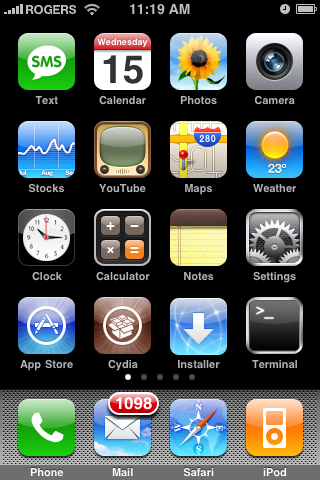
Before you begin please have MobileTerminal and OpenSSH installed from Cydia. You can find MobileTerminal in the Terminal Support section of Cydia. For instructions on how to install an application from Cydia you can use this tutorial.
Step One Download BBUpdaterExtreme from here and save it to your desktop.
Step Two Launch the Terminal application from Applications:Utilities.
Step Three Make sure you iPhone is connected to the same wireless network as your computer and determine its IP Address using these instructions.
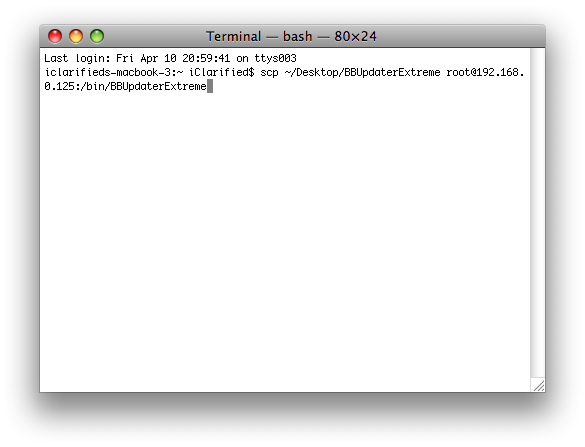
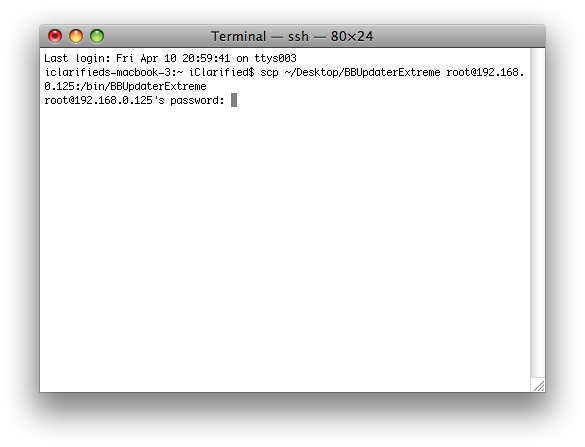
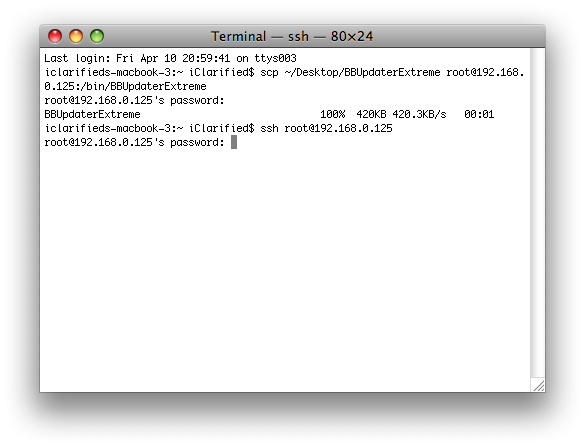
Step Four Enter the following command into the Terminal window replacing the IP Address below with the one for your iPhone. scp ~/Desktop/BBUpdaterExtreme root@192.168.0.125:/bin/BBUpdaterExtreme
You will be asked for your password. Enter alpine as the password.
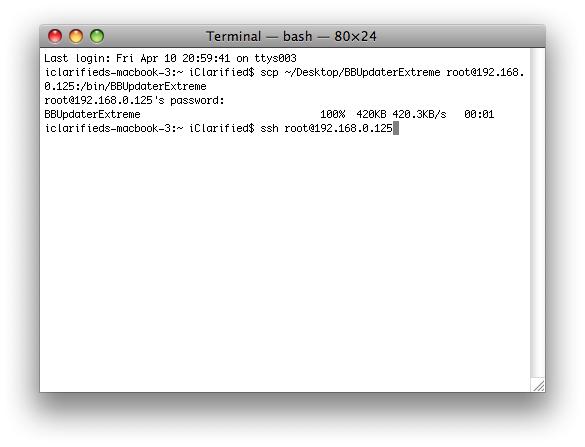
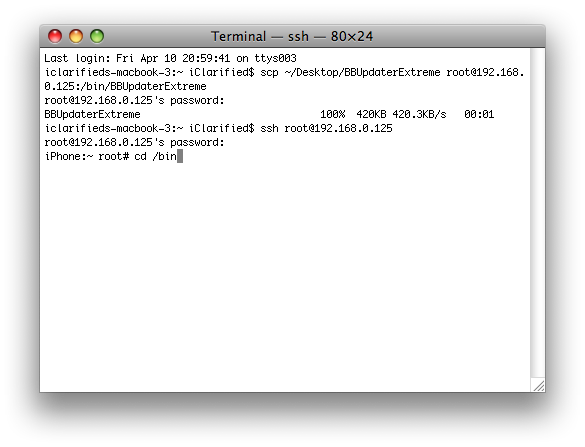
Step Five Input the following command to ssh into your iPhone. ssh root@192.168.0.125
You will asked for your password. Enter alpine as the password.
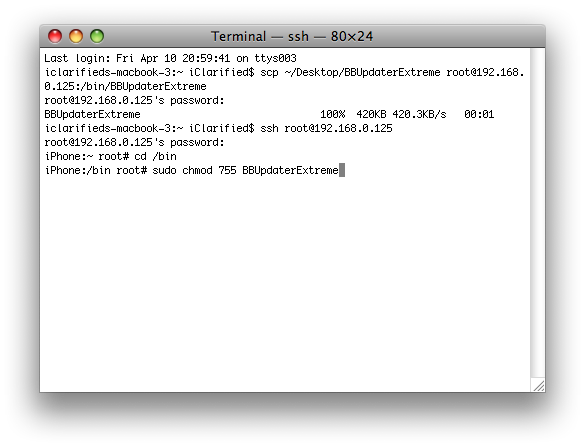
Step Six Input the following commands into the Terminal window cd /bin
Step Seven Your iPhone will now loose its network connections. Launch Mobile Terminal from the iPhone SpringBoard.
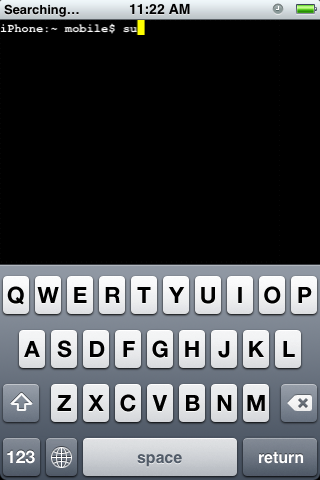
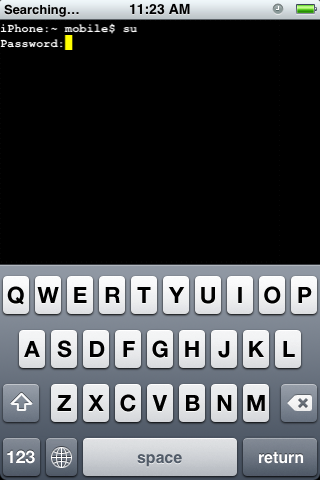
Step Eight Type su into the terminal window. When asked for a password input alpine as the password.
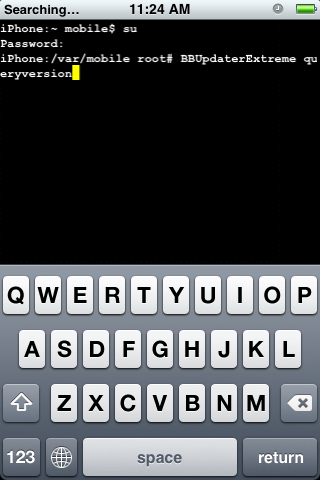
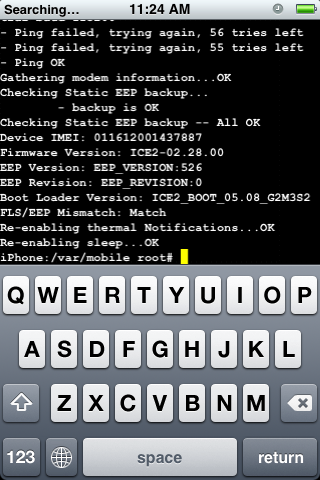
Step Nine Now input BBUpdaterExtreme queryversion to get the bootloader version of your iPhone. It will look something like Boot Loader Version: ICE2_BOOT_05.08_G2M3S2
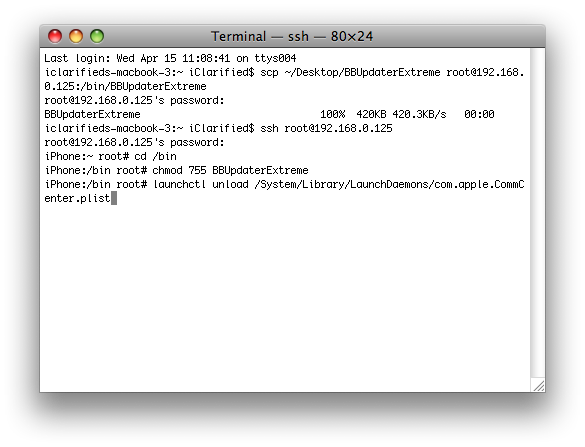
NOTES: You will need to restart your iPhone to regain network connectivity. You could also type launchctl load /System/Library/LaunchDaemons/com.apple.CommCenter.plist into the terminal window.
Get the iClarified Daily Newsletter
Apple news, rumors, tutorials, price drop alerts, in your inbox every evening, free.
Unsubscribe at any time.
Success!
You have been subscribed.
Add Comment
Would you like to be notified when someone replies or adds a new comment?
Yes (All Threads)
Yes (This Thread Only)
No
Notifications
Would you like to be notified when we post a new Apple news article or tutorial?
Ignore my last post - I've made progress, gotten past Step 4 and am now on Step 6. However, when I input "cd/bin" after "Iphone:~ root#", I'm getting a response "No such file or directory". Thanks.
Attn: Zero or anyone who can help! I'm having that same problem others have after Step 4 getting the message "File Not Found", yet BBUpdaterExtreme is on my desktop and SSH is active on my iPhone. How can I use Cyberduck to try and make this work? I've never used an FTP or SSH program before. Thanks.
Actually you always have to use the iPhone's ip address.
Stupid question... Is SSH turned on on your iPhone??. You can also try all this by using cyberduck :)
The IP addresses must be different of course but they have to be on the same network range.... For example the iPhone ip on my network is 192.168.0.103 and my Mac is the 192.168.0.101.
As long as the first three octets are the same (192.168.0) you are good to go.
If in any case this doesn't match it meams that you are connected to a different network or you are connected to an access point with a different IP range settings and you have to change that.
Hope it helps :)
Cheers
Zero
Try copying and pasting into the terminal window... if that doesn't happen, use cyberduck to send the file into the specified folder and then set the permissions in the BB app
You could do it using Cyberduck or WinSCP
Te only thing the first steps does are to copy the BBUpdaterExtreme to the bin folder and then give a 755 permissions to the program.
I get as far as the shuting down the services and then this
launchctl: Couldn't stat("/System/Libary/LaunchDaemons/com.apple.CommCenter.plist"): No such file or directory
nothing found to unload
iPhone:/bin root#
So still can't check the boot loader version
Any help please
thanks
I just had my iphone 3g exchanged at an apple store which was yellowsn0wed but the one that they gave me is with bl 6.02. what does this mean for a potential unlock in future?
I get
scp ~/Desktop/BBUpdaterExtreme root@192.168.1.8:/bin/BBUpdaterExtreme
The authenticity of host '192.168.1.8 (192.168.1.8)' can't be established.
RSA key fingerprint is 6a:94:1d:ba:eb:2c:d4:1b:8f:f3:43:c6:04:2a:ea:b0.
Are you sure you want to continue connecting (yes/no)?
Help please
Thanks! Btw do you know how to disable that low battery logo on iPhone? The one that shows the red battery with the lighting bolt point to the outlet. Whenever I get that, I drop signal with T-Mobile.
Not a clue, but i think the iPhone could be on a power saving function (since you are running out of battery) that cause the signal drop. It has some sense to me :)
hi
i didnt understand.. whats the use of checking the bootloader..???
what happens if you do have the desired bootloader ?
can i put the version 3 beta with the current bootloader i have ? im on fw 2.1 only
and using yellowsn0w for unlock
If you have the 5.08 bootloader it means you can downgrade your baseband from any version. This means that you can unlock any firmware version. Theoretically even the 3.0 beta versions.








![Apple Highlights Child Safety and Screen Time Controls in New Ad [Video]](/images/news/102393/102393/102393-160.jpg "Apple Highlights Child Safety and Screen Time Controls in New Ad [Video]")


![How To Find Your iPhone IMEI Number [Video]](/images/tutorials/83557/83557/83557-160.jpg "How To Find Your iPhone IMEI Number [Video]")

![Magic Keyboard for iPad Air Drops to $200 on Amazon [Deal]](/images/news/102402/102402/102402-160.jpg "Magic Keyboard for iPad Air Drops to $200 on Amazon [Deal]")
![13-Inch M5 MacBook Air With 1TB Drops to $1,449 on Amazon [Deal]](/images/news/102345/102345/102345-160.jpg "13-Inch M5 MacBook Air With 1TB Drops to $1,449 on Amazon [Deal]")